
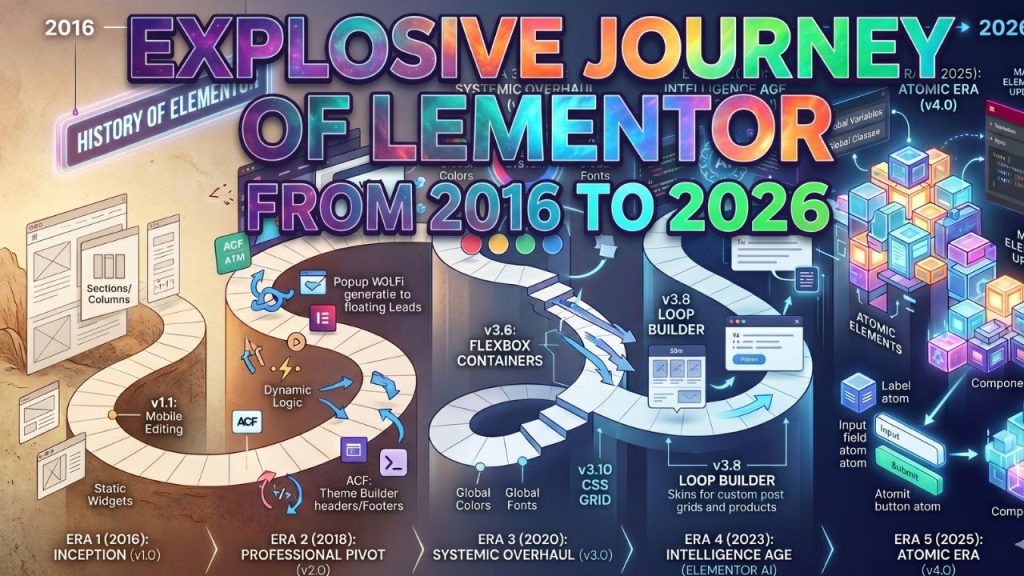
The First Journey: History of Elementor 1.0 (2016)
The history of Elementor began with a radical goal: to eliminate the “guesswork” of WordPress design. Before June 2016, designers relied on shortcodes and “blind” backend builders. When version 1.0 launched, it introduced the first high-speed, live drag-and-drop interface. Today, we will fundamentally learn how Elementor became so popular, what its previous state was, what its current status is, and what the future might hold. Furthermore, we will learn about the features through which Elementor has continuously updated itself.
In this early elementor era, the core focus was on structural elements. The introduction of the Section/Column hierarchy allowed users to create rows and vertical divisions without touching a single line of code. Key updates in the v1.x cycle included the first-ever Mobile Editing (v1.1) tools, giving designers the power to hide elements or change margins specifically for smartphones—a feature that redefined responsive design.
The Professional Pivot: Elementor 2.0 (2018–2019)
As we moved into the second major phase of major versions in elementor, history of Elementor plugin evolved from a page builder into a complete Theme Builder. Released in 2018, Elementor 2.0 allowed users to design “Dynamic” parts of a website like headers, footers, and single-post templates.
Elementor’s main power began when Elementor Version 2 was updated. The core reason for gaining popularity was that it added dynamic features in Version 2. As a result, our static sites were beautifully converted into dynamic sites. Since the demand for dynamic sites is high, Elementor gradually started gaining popularity among people through this feature. In addition, it brought more innovation to single post templates, which are easy to create and usable. This allows designs to be completed very quickly using templates, rather than the hassle of manually adding separate sections to a website.
This era saw the arrival of Dynamic Tags, which connected widgets to data from ACF (Advanced Custom Fields) and Toolset. In elementor page builder updates like v2.4, the Popup Builder was introduced, effectively killing the need for separate lead-generation plugins. By the end of this era, Elementor wasn’t just a tool for pages; it was an entire ecosystem for site architecture.
Then, gradually, came 2.4. Several more excellent features were added here. Alongside dynamic content, Elementor provided builder the opportunity to create dynamic tags and advanced custom fields. Furthermore, the Popup Builder was newly introduced again in the template section, allowing us to easily promote any offer anywhere on the website. Creating such popups greatly started assisting our lead generation efforts. After this, scraping data from any website became as easy as getting water in hand (very easy) for us.
The Systemic Overhaul: History of Elementor 3.0 (2020–2022)
In 2020, Elementor v3.0 launched with a focus on “Design Systems.” This version replaced static styling with Global Colors and Global Fonts, ensuring that a single change in the site settings would update every widget instantly.
Elementor 3 reintroduced the option to change Global Fonts and Global Colors. This was an extremely impressive feature. If you need to change only the button color after building an entire website, changing the button color from the Global Color option activates that feature. Not just buttons, but everything from your text to background color could be done through this version. The Global option holds significant importance for us. Moreover, using the Global option ensures that a website’s UI and UX design system remains perfectly consistent. Your UI/UX is complete if you can maintain global styling and everything else correctly to attract any client. The Elementor 3 update was no less important than any other update.
However, the most significant shift in this period was the move toward performance. In elementor updates v3.6, the team introduced Flexbox Containers. This was a pivotal moment in the history of Elementor, as it began the slow phase-out of the heavier Section/Column structure in favor of a leaner, more modern CSS approach. This was followed by native CSS Grid support in v3.10, allowing for complex, overlapping layouts that were previously impossible. What Elementor 3.6 brought is beyond description. A section that previously took us about 10 to 12 minutes to build can now be completed in just 30 seconds. What kind of section did they introduce that made it possible to do it so fast?
Elementor 3.6 introduced the Flexbox Container. It crushed the inner section and created a new gateway. The hassle we used to face in creating three, five, or seven odd sections using inner sections was instantly eliminated by the Flexbox Container. With Flexbox, we could easily create any design we wanted, whenever we wanted. Moreover, making designs has become very simple with the arrival of Flexbox. The ease of design and content manipulation brought by Elementor 3.6 would have been unimaginable otherwise. Therefore, Elementor 3.6 is considered a major update in WordPress website design.
The Intelligence Age: Elementor AI (2023–2024)
The 2023–2024 period was dominated by the integration of Generative AI. In the history of Elementor – AI allowed creators to generate text, custom CSS, and even high-fidelity images directly within the editor.
The biggest update that came in 2023 and 2024 was the integration of AI with Elementor Page Builder. However, there was some controversy in this regard because the AI was not performing very well. It could not be trained well even with excellent prompts in Elementor’s context. Now, due to some updates, the AI generates better prompts and can provide good designs. Still, as a good developer, I personally cannot rate Elementor as the best. The main reason is that Elementor is still not as powerful as a developer who can customize a site very effectively.
During these elementor page builder updates, the focus shifted heavily toward “Loop Builders” (v3.8). This allowed designers to create custom skins for post grids and WooCommerce products, bringing a level of customization to dynamic lists that had never been seen before in a no-code environment.
The Atomic Era: Elementor 4.0 (2025–Present)
Entering 2026, we have reached the pinnacle of the plugin’s evolution: the atomic elementor updates. The launch of the Atomic Editor (v4.0) in early 2026 marked the most significant architectural change in a decade. History of Elementor relates that the 4th industrialization integrates with us.
Elementor Version 4 has arrived in 2026, which relies on the Atomic Editor. However, there has not been much response from developers regarding the Elementor update yet. Some developers say they have used it and found it much softer and easier than before. But we are still doubtful about what the main features are and how much they will help developers.
Unlike the monolithic widgets of the past, the atomic elementor updates introduced Atomic Elements. These are modular building blocks—like a single Label, an Input field, or a Submit button—that can be nested and styled independently within a container. This is most visible in the Atomic Form Builder, where every part of a form is its own “atom” that can be moved and styled with its own CSS classes. This era also introduced Global Variables and Classes, allowing professional developers to manage site-wide styling through a unified CSS-like framework inside a visual UI.
Major Versions in Elementor: History of Elementor
| Era & Version | Major Focus | Landmark Elements Updated | Technology Foundation |
| v1.0 (2016-17) | Visual Layout | Sections, Columns, Basic Widgets | PHP & Basic JS |
| v2.0 (2018-19) | Theme Building | Header/Footer, Popups, Dynamic Tags | Dynamic Content API |
| v3.0 (2020-22) | Performance | Global Styles, Flexbox Containers | Design Systems & CSS Flex |
| v3.8-3.23 (23-24) | AI & Loops | Loop Builder, AI Copilot, CSS Grid | Generative AI & CSS Grid |
| v4.0 (2025-26) | Atomic Design | Atomic Forms, Components, Variables | Atomic Architecture |
Conclusion: The Future of Atomic Design
Looking back at the history of Elementor, the trajectory is clear: the tool has moved from simple visual editing to a high-performance system for professional web applications. The latest atomic elementor updates prove that the platform is no longer just for beginners; with major versions in elementor now supporting advanced CSS logic and modular atoms, it remains the industry leader for WordPress creators in 2026.




2 Comments
Your comment is awaiting moderation.
Thanks for the detailed breakdown, very useful.
[…] didn’t become the world’s most popular WordPress page builder by accident. With over 10 million active installations, it has earned its reputation across every […]
[…] → best website builders for tradespeople […]