
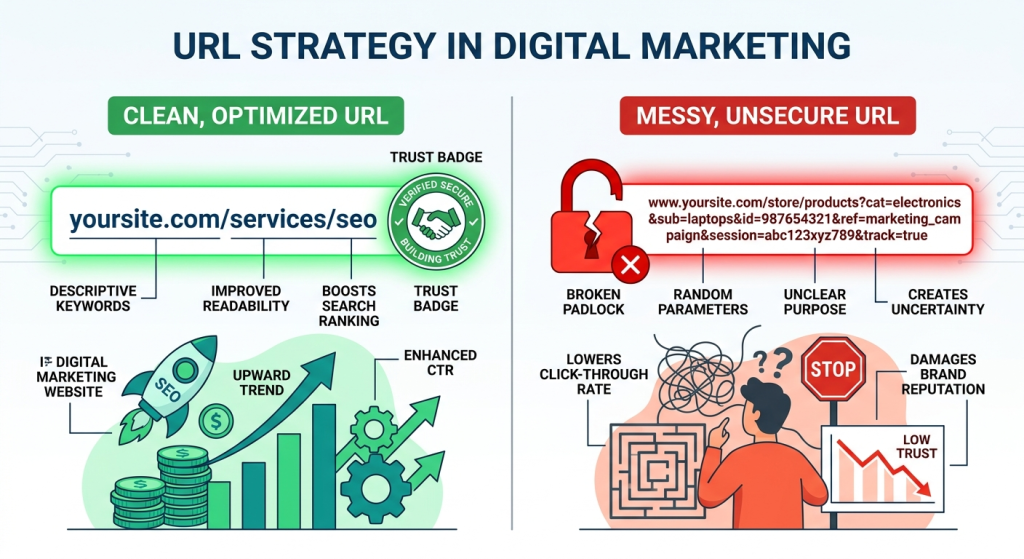
You spend thousands on ad copy, A/B test your CTA buttons, obsess over email subject lines — and then completely ignore the one thing sitting right at the top of every single page your visitor lands on.
The URL bar.
Most marketers treat URLs as an afterthought — something the developer handles, something that “just works.” But in reality, your URL structure is doing a full-time job you never hired it for. It’s building trust, signalling authority, guiding user behaviour, and yes — directly influencing whether someone converts or quietly closes the tab.
In this guide, we’re going deep into the psychology and strategy behind URL architecture. Not just the technical SEO side (though we’ll cover that too), but the human side — how real users feel about what they see in that address bar, and what that means for your digital marketing results.
Why the URL Bar Is a Trust Signal Nobody Talks About
Think about the last time you hovered over a link before clicking it. Your browser showed you the destination URL in the status bar. In that split second, your brain ran a threat assessment.
Does this look legitimate? Does it match what I expect? Is this going to take me somewhere weird?
This happens at a subconscious level, and it happens fast. Research in user experience design consistently shows that people make micro-trust decisions before a page even loads — and the URL is one of the primary inputs into that decision.
A clean URL like codethesis.io/blog/email-marketing-tips tells a story. It says: this website is organised, this content is intentional, and these people know what they’re doing.
A URL like codethesis.io/p=4712&ref=abc&session=xK9p2 tells a very different story.
When you understand this, you start to see URL structure not as a developer concern — but as a conversion rate optimisation strategy.
The Psychology of Predictability
Here’s a principle from behavioural psychology that applies directly to URL design: humans are calmed by predictability.
When patterns make sense, anxiety drops. When patterns break, alarm bells ring.
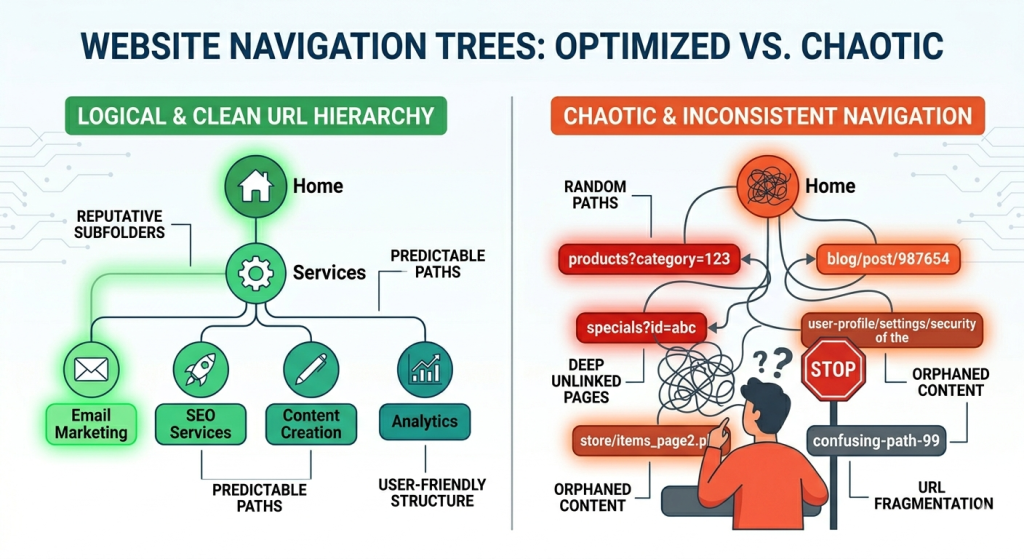
Your URL structure creates an implicit promise to your visitor. If your blog posts live at /blog/post-name, and your service pages live at /services/service-name, users quickly learn the map of your website — even without thinking about it. They know where they are. They know how to navigate. That comfort translates directly into longer sessions, more page views, and higher conversion intent.
Break that pattern — mix slugs, use dates in some URLs but not others, shuffle category paths — and you introduce cognitive friction. The user doesn’t consciously notice what’s wrong, but they feel slightly unsettled. That unsettled feeling is the enemy of conversion.
URL Length: Short Isn’t Just Pretty — It’s Persuasive
There’s a myth in some corners of the SEO world that longer URLs with more keywords perform better. This was marginally true in 2010. Today, it’s not only wrong — it can actively hurt you.
Short, focused URLs work better for three reasons:
1. They’re scannable in search results. Google typically truncates URLs in SERPs after about 75 characters. If your URL gets cut off, users see broken context — which reduces click-through rates on organic results.
2. They’re shareable. When someone copies your URL to paste in a Slack message, an email, or a tweet, a 140-character URL full of parameters looks like spam. A clean short URL looks like a recommendation.
3. They signal directness. Psychologically, a shorter URL implies that your site architecture is clean. It suggests the page is exactly what it says it is — no fluff, no detours, no mess.
For your digital marketing content specifically, aim for URLs like:
/blog/email-marketing-tips✅/blog/2024/11/14/the-ultimate-guide-to-email-marketing-tips-for-small-businesses-in-2024❌
The goal is clear, human-readable paths that immediately communicate the page’s value.
Keywords in URLs Still Matter — Just Not the Way You Think
The SEO world has had an ongoing debate about keyword-rich URLs. Let’s settle it plainly: keywords in URLs are still a relevance signal, but their weight has shifted from search engine ranking to user confidence.
When a user searches “email marketing automation” and sees a result with /email-marketing-automation in the URL, there’s a subconscious click of recognition. Yes, this is the page I’m looking for.
That confirmation reduces friction at the click decision. It also reduces bounce rate because users who arrive already confident they’re in the right place are less likely to immediately leave.
For your CodeThesis blog, this means writing URL slugs that speak to the reader’s search intent — not just stuffed with keywords, but genuinely descriptive of what the page delivers.
A few principles:
- Use hyphens, never underscores (Google reads hyphens as word separators)
- Remove stop words like “a”, “the”, “and” from slugs where possible
- Keep it to 3–5 words maximum
- Make it a human sentence, not a keyword list
How Redirects Quietly Erode Trust
“Image prompt: A visual metaphor showing a user following a path that keeps redirecting through multiple road signs, each adding a tiny bit of friction, until they finally arrive — looking frustrated — at their destination. Flat design, digital marketing context, use warm amber and cool blue tones.”
Redirects are necessary. Websites evolve. Pages move. Domains get rebranded. But every redirect comes with a cost that most marketers don’t account for.
The cost isn’t just page speed (though redirect chains do slow load times, and Google’s Core Web Vitals penalises slow pages). The cost is also psychological.
When a user clicks a link and their browser visibly loads, redirects, then loads again — even if it takes only half a second — something registers. It feels unstable. Like the website doesn’t quite know where it’s going. For high-intent pages like pricing pages, checkout flows, or lead capture forms, that instability is catastrophic.
Best practices for redirect hygiene in digital marketing campaigns:
- Always update internal links to point directly to the final destination — never rely on a redirect as a permanent solution
- Audit your redirect chains quarterly. Tools like Screaming Frog or Ahrefs can map every redirect on your domain
- When running campaigns, double-check that landing page URLs in your ads point directly to live pages, not redirected ones
- For any site migration or rebrand, create a comprehensive URL mapping document before launch day — not after
The relationship between clean redirects and trust is direct. If you’re running email campaigns for clients or your own brand, a broken or redirect-heavy landing page URL will tank your conversion rate before the copy even gets a chance.
Subdirectories vs Subdomains: A Decision That Affects User Trust
This is one of the most debated structural decisions in SEO and digital marketing, and it has a real impact on both search performance and user trust.
The question: should your blog live at yoursite.com/blog or blog.yoursite.com?
From a pure SEO standpoint, subdirectory structures (yoursite.com/blog) tend to outperform subdomains because all content lives under one domain authority. Every link pointing to your blog posts reinforces the authority of your root domain.
But from a user trust perspective, there’s an equally important consideration. Subdomains signal separation. When a user lands on support.yoursite.com or shop.yoursite.com, there’s an implicit message that this is a different section — almost a different product. That’s sometimes intentional. But for content marketing, you almost always want your blog, your service pages, and your lead pages to feel like they’re part of the same unified experience.
For CodeThesis and similar digital marketing blogs, the recommendation is clear: keep all content under a clean subdirectory structure. This builds cumulative domain authority while presenting users with a coherent, trustworthy site structure.
The E-Commerce Lesson Every Marketer Needs to Learn
“Image prompt: A close-up of a browser address bar during an e-commerce checkout, showing a clean URL like ‘store.com/checkout/payment’ next to a padlock icon and green security indicator. Below it, show a cart abandonment stat graphic. Modern, professional, dark blue and white colour palette.”
Nowhere is URL psychology more expensive to get wrong than in e-commerce checkout flows.
Cart abandonment remains one of the most frustrating problems in digital marketing, and it has many causes: unexpected shipping costs, forced account creation, slow load times. But a surprisingly underrated cause is URL instability during checkout.
When a customer progresses from cart to checkout, and the URL suddenly looks like store.com/checkout?token=8f72kd9s&session=tmp_cart_abc123, two things happen:
First, the URL looks insecure. Even if the page has an SSL certificate, the messy URL creates a dissonance between “this feels professional” and “this looks like a phishing link.”
Second, the URL breaks the sense of progress. Clean checkout URLs like /checkout/cart, /checkout/shipping, /checkout/payment act as a visual breadcrumb. The user knows where they are in the journey. That clarity reduces anxiety at the most critical trust moment — when they’re about to hand over their payment details.
If you’re advising e-commerce clients as part of your digital marketing work, URL audit of checkout flows should be on every onboarding checklist.
URL Parameters and Privacy: A Growing Trust Issue
As privacy awareness among web users increases — driven by GDPR, iOS tracking changes, and growing media coverage of data collection — URL parameters have become a subtle but real trust issue.
A URL loaded with tracking parameters like:
/landing-page?utm_source=email&utm_medium=newsletter&utm_campaign=spring2025&fbclid=IwAR2xyz&gclid=abc123
…is entirely normal from a marketing analytics perspective. But to a non-technical user, it looks like the website is tracking their every move. And increasingly, they’re right to think so.
How to handle this without sacrificing analytics:
- Use UTM parameters consistently but minimally —
utm_source,utm_medium, andutm_campaignare usually sufficient - Consider using URL shorteners or clean landing page aliases for high-visibility placements (print, video, social bios)
- For email campaigns, clean URLs on landing pages build more trust than parameter-heavy ones — especially for B2B audiences where recipients are more technical
- Use server-side analytics where possible to reduce the parameter load visible in the URL
The goal is to collect the data you need without making your URL look like a surveillance receipt.
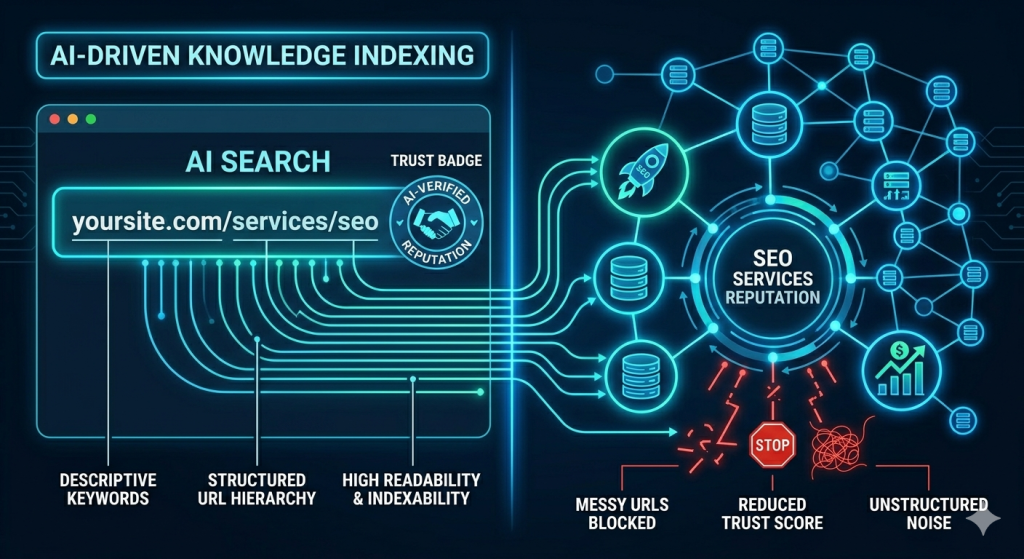
If you’re not thinking about how your URL structure interacts with AI-powered search features, you’re already behind.
Google’s AI Overviews, Bing’s Copilot integration, and emerging AI search platforms like Perplexity all rely on understanding content relationships. They’re not just indexing pages — they’re building knowledge graphs that connect topics, establish authority, and determine which content surfaces in AI-generated answers.
A clean, hierarchical URL structure helps AI systems understand how your content clusters relate to each other. If your content on email marketing lives under /blog/email-marketing/, and within that you have /blog/email-marketing/subject-lines, /blog/email-marketing/automation, and /blog/email-marketing/segmentation — the AI can infer that you have deep, clustered expertise in email marketing. That cluster becomes a signal of topical authority.
Conversely, if all your content sits at a flat /blog/post-name structure with no topical hierarchy, AI systems see a pile of unrelated articles rather than a coherent expertise signal.
For CodeThesis specifically, building topic cluster URL structures into your editorial calendar isn’t just good SEO practice for 2025 — it’s how you get featured in AI-generated answers and knowledge panels.
Multi-Device Consistency: Mobile Makes URL Problems Visible
On desktop, a messy URL sits quietly in a bar that most users glance at occasionally. On mobile, that same bar is front and centre, occupies more relative screen space, and gets noticed more often — especially when users long-press links to preview destinations before clicking.
There are three specific mobile moments where URL quality directly impacts trust:
1. Link preview on share: When a URL is shared in WhatsApp, Instagram DMs, or iMessage, the link preview often includes the URL itself. A clean URL looks like a legitimate recommendation. A parameter-heavy one looks like a tracking link — and many users now know to be wary of those.
2. Address bar visibility on scroll: Mobile browsers show the URL bar when users scroll up to the top. If they land on a page during a campaign and notice a chaotic URL, doubt is planted.
3. Copy-pasting URLs on mobile: Mobile users who try to share your content by copying the URL from the address bar will copy every parameter in it. Clean, short URLs get shared more because they’re less intimidating to paste.
For your email marketing content at CodeThesis, make sure every article has a clean mobile-friendly URL before it goes live — especially content you plan to amplify on social or in newsletters.
URL Errors Are Brand Damage You’re Not Measuring
404 errors, broken redirects, inconsistent trailing slashes, mixed case in URLs — these aren’t just technical annoyances. They’re brand experiences.
When a user follows a link from your email campaign, your social bio, or a backlink from another site — and lands on a 404 page — you’ve lost more than a session. You’ve introduced doubt. Is this site maintained? Is it legitimate? Did the content get deleted?
According to Ahrefs’ research on crawl errors, even well-maintained sites accumulate broken links over time. The difference between brands that maintain trust and those that slowly erode it is often just the discipline to audit and fix these issues regularly.
A basic URL health audit checklist for digital marketers:
- Monthly: Check all active campaign URLs are resolving correctly
- Quarterly: Run a full site crawl for 404s and redirect chains
- On every site update: Verify that any changed page URLs have proper 301 redirects in place
- Before every email send: Click every link in the email yourself, on both desktop and mobile
This is particularly relevant for email marketing — a broken link in an email campaign damages your sender reputation, your brand, and your conversion rate simultaneously.
How Your Domain Setup Affects URL Trust Signals
Before we wrap up, there’s one layer deeper worth addressing: your domain configuration itself.
Your URLs can be perfectly structured, but if your domain setup is weak, it undermines everything. This includes:
- SSL/HTTPS: Every URL on your site must use HTTPS. An HTTP URL in 2025 is a red flag that triggers browser warnings and destroys trust instantly.
- www vs non-www consistency: Choose one canonical version and redirect all others. Mixing
www.codethesis.ioandcodethesis.ioin your links creates inconsistency signals for both users and search engines. - Domain age and authority: A newer domain carries less inherent trust than an established one. This is one reason to build your URL structure thoughtfully from the start — every consistent, well-structured URL published builds cumulative trust equity over time.
- Professional email alignment: Your domain should be consistent across all touchpoints. Sending emails from
team@codethesis.iowhile your website iswww.codethesis.iois fine — sending from a generic Gmail while your site has a custom domain creates a professionalism gap that damages brand perception.
For digital marketers managing their own brand or client brands, treat domain hygiene as a fundamental deliverable — not an optional technical task.
Final Thoughts: The Invisible Architecture of Trust
URL structure is one of those rare things in digital marketing where technical best practices and human psychology align completely. Clean, predictable, hierarchical URLs are better for SEO and better for users and better for conversions. There is no trade-off.
The marketer who treats URL architecture as a strategic asset — not just a developer concern — is the one whose campaigns land on pages users trust, whose content ranks in AI-powered search, and whose conversion rates hold up under scrutiny.
Start with an audit. Look at your most important pages. Ask yourself: if a stranger saw this URL before loading the page, would they feel confident? Would they know what to expect? Would they trust what’s coming?
If the answer is anything less than yes — you have work to do.
About CodeThesis: We write practical, no-fluff digital marketing content for marketers, founders, and growth-focused teams. From email marketing strategy to SEO, conversion optimisation, and beyond — we cover what actually moves the needle.
Tags: URL Structure, SEO, Digital Marketing, Conversion Rate Optimisation, User Trust, Email Marketing, Web Strategy, Technical SEO




2 Comments
[…] this early elementor era, the core focus was on structural elements. The introduction of the Section/Column hierarchy […]
[…] crown in 2026, the market isn’t static. In response to the central question in our visual, “Why Elementor??“, a new wave of alternatives has emerged, each trying to address perceived weaknesses like […]