Free vs premium WordPress themes — it's one of the first real decisions every website owner faces, and surprisingly, it still trips people up in 2026. The WordPress theme repository has over 11,000 free themes, while the premium market has grown into a multi-billion-dollar industry with players like ThemeForest, Elegant Themes, and StudioPress. So which side actually wins?
The honest answer: it depends — but not in the vague, unhelpful way you've read before. This guide breaks down exactly what you're getting (and giving up) with each option, from load speed and SEO performance to long-term security and real cost of ownership. Whether you're building a personal blog, an e-commerce store, or a client website, this is the comparison you actually need.
What Are Free vs Premium WordPress Themes, and Why Does It Matter?
A WordPress theme controls the visual appearance and front-end structure of your site — everything from typography and color palettes to how your blog posts are laid out and how your header behaves on mobile. At its core, choosing between a free vs premium WordPress theme is choosing between two very different levels of investment, support, and long-term reliability.
Free WordPress Themes
Free themes are available directly through the WordPress.org theme directory. To be listed there, themes must pass a strict review process covering coding standards, security, and accessibility. Popular free themes like Astra (free tier), Hello Elementor, and OceanWP have millions of active installs and are genuinely well-built. Many professional developers start projects with these.
Premium WordPress Themes
Premium themes are sold through third-party marketplaces like ThemeForest (Envato Market), directly from developers (Divi by Elegant Themes, GeneratePress Pro, Kadence Pro), or through club memberships (StudioPress). Prices typically range from $29 to $200+ for a single license, with some club memberships running $200–$350/year for unlimited access.
Context Check
Many of the "best free themes" — like Astra, GeneratePress, and Kadence — also have premium versions. You're often choosing between the free tier and the pro upgrade of the same theme, which makes the comparison more nuanced than "free directory theme vs expensive marketplace theme."
The Real Cost of "Free" — It's More Complicated Than You Think
The word "free" is seductive, but savvy website owners know that the true cost of a theme isn't the sticker price — it's the total cost of ownership over 12, 24, or 36 months. Let's do the math honestly.
Hidden Costs of Free Themes
Most free themes offer a limited feature set. To get the advanced functionality you actually want — sticky headers, WooCommerce integration, mega menus, advanced typography controls — you'll likely install multiple plugins to compensate. Each plugin adds:
- Potential performance overhead (bloating your page size)
- Additional maintenance and update responsibilities
- Possible plugin conflicts (a very real headache)
- Sometimes, additional plugin costs
Time is money, too. If you spend 15 extra hours wrestling with a free theme's limitations — trying to replicate a design that a premium theme ships out-of-the-box — that's a real cost, even if it never hits your credit card.
What Premium Themes Actually Cost
A one-time premium theme purchase in the $49–$79 range amortized over 3 years is less than $2/month. When you factor in what that buys — dedicated support, regular feature updates, built-in integrations, and professional design — the value proposition is strong. The question isn't "can I afford a premium theme?" It's "what is my time and professional reputation worth?"
↳ Best WordPress Tips for Beginners — codethesiss.com
Design Quality & Customization: Looks Aren't Everything, But They're a Lot
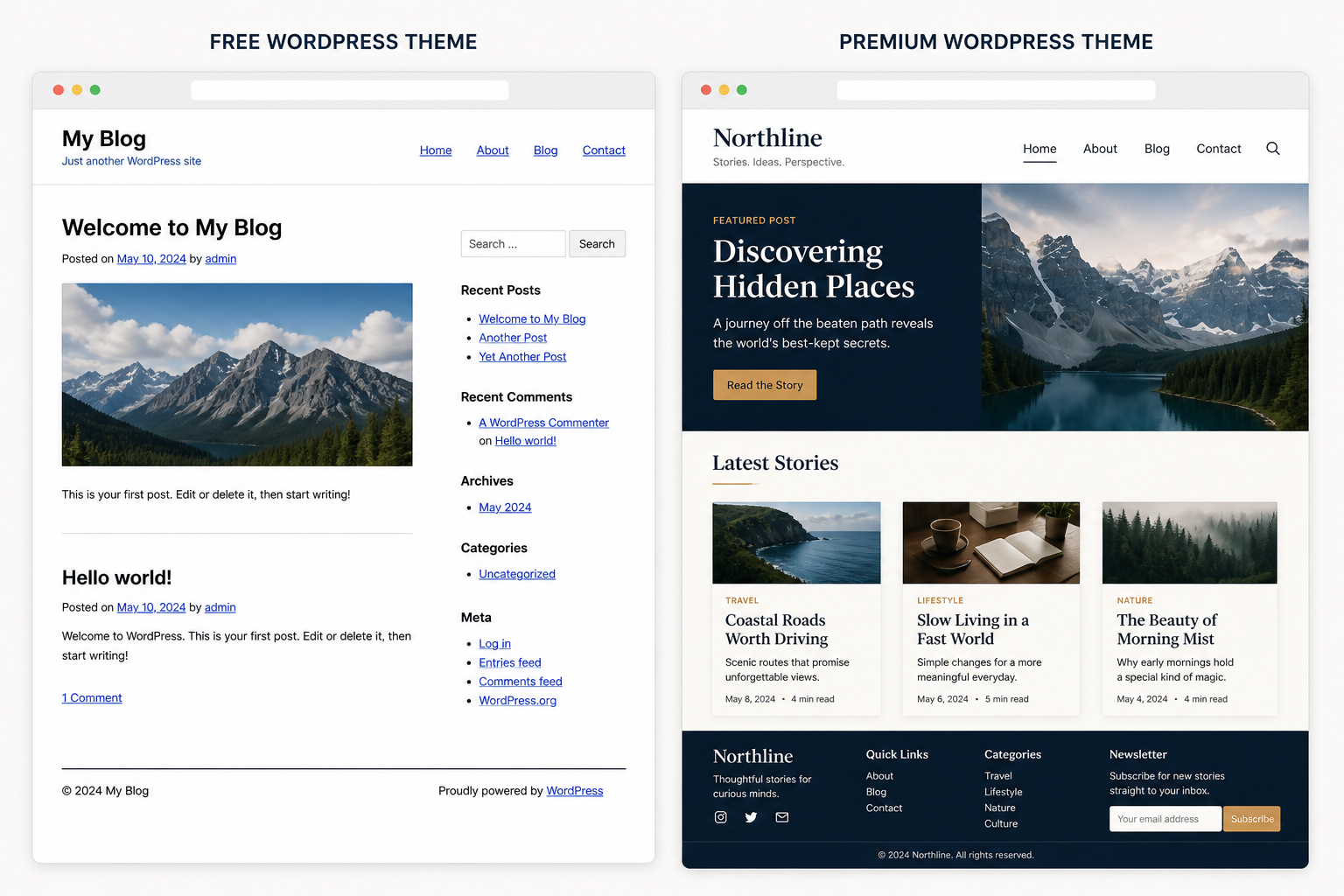
One of the most significant differences between free and premium WordPress themes shows up the moment you open the Customizer. Free themes tend to offer basic controls: background color, header image, a few font choices. Premium themes often ship with a dedicated options panel — sometimes powered by the Customizer, sometimes a custom admin page — with granular control over every section of your site.
Free Theme Design Reality
Quality free themes like Neve, Blocksy, and Astra are genuinely attractive and well-designed. But their free versions limit color controls, typography options, and layout flexibility. You'll get a clean starting point, but making it truly unique typically requires either upgrading to the pro version or spending time building with a page builder like Elementor — which brings its own complexity.
Premium Theme Design Advantage
Premium themes often include dozens or even hundreds of professionally designed demo sites that you can import in one click. Themes like Divi, Avada, and X Theme ship with 100+ pre-built page templates. A designer working on client sites can have a polished foundation deployed in under an hour. That's a real, measurable advantage for agencies and freelancers.
Pro Tip
If customization depth matters to you, look at block-based themes like Kadence or GeneratePress. Their free tiers are robust, and their pro upgrades are targeted — you pay for exactly the features you need rather than a bloated all-in-one package.
Performance & Core Web Vitals: Where the Rubber Meets the Road
Google's Core Web Vitals — Largest Contentful Paint (LCP), Cumulative Layout Shift (CLS), and Interaction to Next Paint (INP) — are now confirmed ranking signals. Your theme is directly responsible for a significant portion of your site's performance scores. This is where the free vs premium WordPress themes debate gets technical, and where some premium themes actually fall behind.
The Bloat Problem in Premium Themes
Here's the uncomfortable truth: many popular premium themes — particularly multipurpose behemoths like Avada, Salient, or Enfold — are notorious for loading huge amounts of CSS and JavaScript, even on pages that don't use most of their features. This can tank your Core Web Vitals scores and directly harm your search rankings.
Lightweight Themes Win on Performance
In independent benchmark tests, themes like GeneratePress and Kadence — both of which have free and premium tiers — consistently score 95+ on Google PageSpeed Insights out of the box. These themes prioritize performance above all else. The free version of GeneratePress, for example, has a total file size under 30KB. That's extraordinary.
The lesson here isn't "free themes are faster" — it's that lightweight, well-coded themes are faster, and those exist in both categories. A bloated premium theme will always lose to a lean free theme on performance.
↳ WordPress Speed Optimization Guide — codethesiss.com
SEO Implications of Free vs Premium WordPress Themes
When comparing free vs premium WordPress themes from an SEO perspective, the theme itself is a foundational element — not a magic bullet, but absolutely a factor you can't overlook.
Schema Markup & Structured Data
Premium themes and well-maintained free themes from reputable developers often include built-in Schema.org structured data markup. This helps Google understand your content — whether it's an article, a product, a recipe, or a local business — and can unlock rich results in search. Bargain-basement free themes from unknown developers rarely include this.
Mobile Responsiveness Is Non-Negotiable
Google uses mobile-first indexing, which means it predominantly uses the mobile version of your content for indexing and ranking. Every theme listed on WordPress.org must be responsive, so free themes from the official directory are safe here. That said, premium themes often offer more refined mobile behavior — collapsing navigation, touch-optimized sliders, and adaptive image loading — that results in better mobile user experiences and lower bounce rates.
Header Tags, Semantic HTML & Accessibility
SEO-optimized themes output clean, semantic HTML with proper heading hierarchy (H1 → H2 → H3), ARIA labels for accessibility, and optimized image handling. Poor code quality — something more common in themes from unknown developers, whether free or paid — can result in duplicate H1 tags, improper nesting, or missing alt text defaults. These are all crawlability issues that affect your rankings.
SEO Warning
Never judge a theme's SEO-friendliness by its visual design alone. Always check the page source for proper HTML semantics, and run it through Google's Rich Results Test and PageSpeed Insights before committing.
Security & Code Quality: The Stakes Are High
A compromised WordPress site costs real money and real reputation. Themes are one of the most common entry points for WordPress security vulnerabilities, and the quality of the code matters enormously.
Free Themes from WordPress.org
Every theme in the official WordPress.org repository passes a manual review by the WordPress theme review team. They check for: proper escaping of data, no encrypted code, no unauthorized external links, and adherence to WordPress coding standards. This review isn't perfect, but it provides a meaningful baseline of safety.
Premium Themes: Verify Before You Buy
Premium themes from reputable developers — GeneratePress, Kadence, Divi, StudioPress — are generally very well-coded and maintained. The concern is with themes from low-quality marketplaces or themes downloaded from "nulled" (pirated) theme sites. Nulled premium themes are one of the biggest sources of WordPress malware. Never install a theme you haven't purchased from a legitimate source.
For any theme you're considering, check Patchstack's vulnerability database to see its security history before installing it on a live site.
Support, Updates & Longevity
This is arguably where free vs premium WordPress themes diverge most dramatically — and where the stakes are highest for businesses that depend on their website.
Free Theme Support: Community-Dependent
Free theme developers are typically volunteers or companies using the free tier as a marketing funnel for their premium product. Support is provided through the WordPress.org forums, where response times can range from hours to weeks — or never. If you're running a business site and your layout breaks after a WordPress core update, waiting days for a forum reply is not an option.
Premium Theme Support: Dedicated & Accountable
Most premium theme vendors offer dedicated support via ticketing systems, live chat, or private forums — often with guaranteed response times. Elegant Themes (Divi) offers 24/7 live chat support. GeneratePress Pro has an active support forum monitored by the developer himself. This level of accountability is invaluable when something breaks.
Update Frequency & WordPress Compatibility
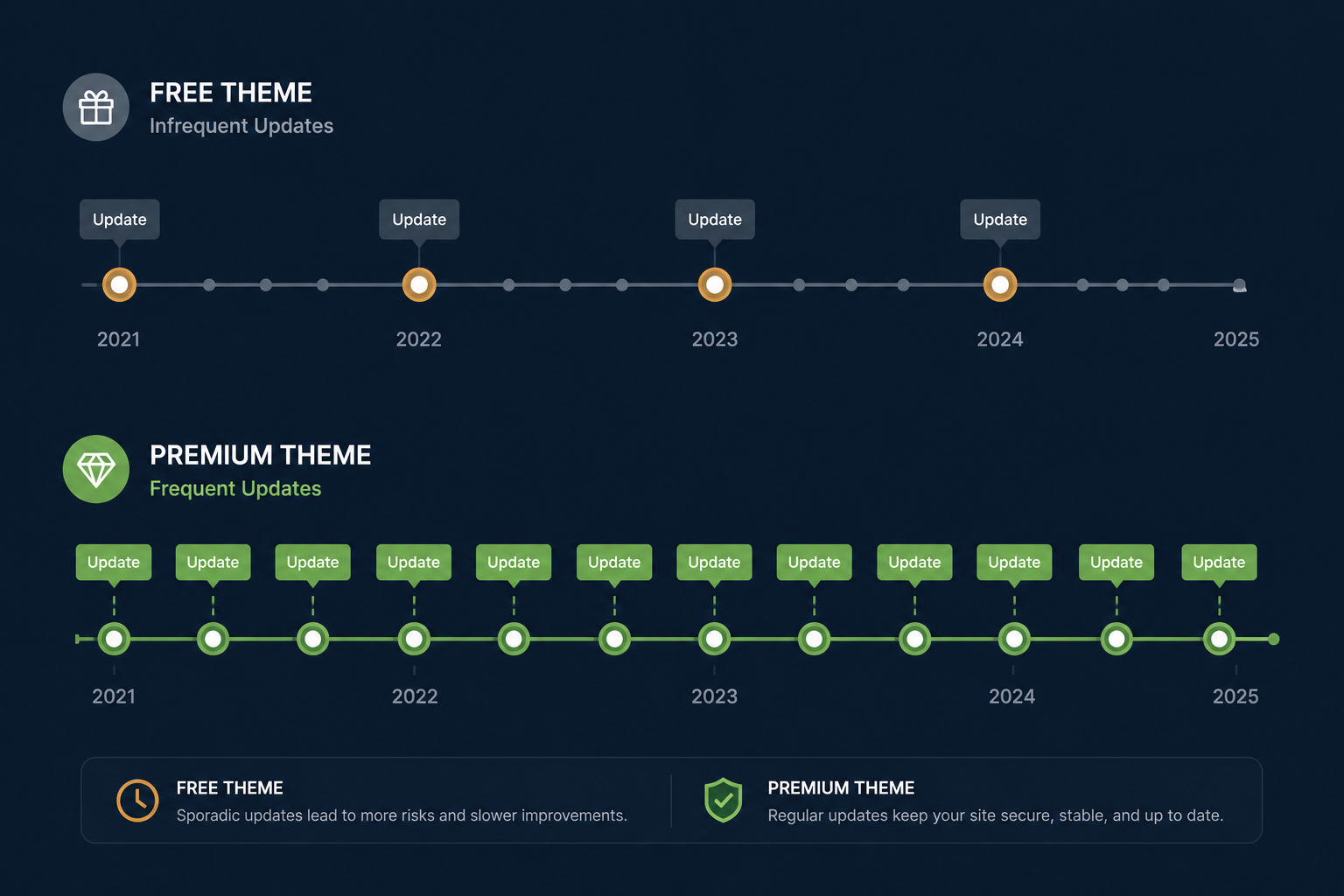
Free themes in the WordPress.org directory are required to maintain compatibility with current WordPress versions to remain listed. Premium themes from established vendors typically push updates faster, often releasing compatibility updates within days of a new WordPress core release — sometimes before it even officially drops.
Free vs Premium WordPress Themes: Side-by-Side Comparison
The Honest Verdict: Who Should Choose Which?
There's no universal winner in the free vs premium WordPress themes debate. What there is, however, is a right answer for your specific situation. Here's how to think about it clearly.
Choose Free If…
You're Just Getting Started
- →This is your first WordPress site
- →Budget is a genuine constraint
- →You're still learning WordPress
- →It's a personal blog or hobby project
- →You're testing a niche before investing
- →You plan to use Astra, Neve, or Kadence free
Choose Premium If…
You're Building for Results
- →This is a business or client site
- →Revenue depends on your website
- →You need dedicated, fast support
- →Design differentiation matters
- →You're running an online store
- →Long-term maintenance is a priority
The middle ground — and increasingly the smart choice for many — is the freemium model: start with the free version of a reputable theme (Astra, Kadence, GeneratePress), validate your site concept, then upgrade to the paid tier when you need more. You get the best of both worlds: zero initial risk, then a targeted investment when you're ready.
↳ Best WordPress Themes for Blogs in 2026 — codethesiss.com
Top Theme Picks for 2026 (Free & Premium)
Best Free WordPress Themes
Astra — The most popular free theme on WordPress.org, with over 2 million active installs. Lightweight (<50KB), fast, and Gutenberg-compatible. The free version is genuinely useful for most blog and business sites.
Kadence — A rising star that has rapidly become a developer favorite. Its free tier includes a full-site block editor experience and impressively clean code. One of the fastest themes you'll find at any price.
Blocksy — Modern, block-native, and beautifully designed. Excellent free tier with WooCommerce styling included. A genuine premium feel without the price tag.
Best Premium WordPress Themes
GeneratePress Premium ($59/year) — The gold standard for performance-first web development. If your primary concern is speed and clean code, nothing beats it.
Divi by Elegant Themes ($89/year) — The most popular premium WordPress theme in the world, with a built-in visual builder, 100+ website packs, and 24/7 support. Best for designers and agencies.
Kadence Pro ($79/year) — The pro upgrade to the free Kadence theme. Adds advanced header/footer builder, WooCommerce enhancements, and premium starter templates. Exceptional value.
↳ Essential WordPress Plugins for Every Website — codethesiss.com
Conclusion: Make a Choice That Serves Your Goals, Not Your Fear of Spending
The free vs premium WordPress themes question doesn't have a simple answer — it has the right answer for where you are and where you're going. If you're starting out, a high-quality free theme like Astra or Kadence will serve you beautifully and costs you nothing. If you're running a business, managing client sites, or building something you expect to drive real revenue, the investment in a premium theme — $59 to $100 per year — is trivially small compared to what it protects and enables.
What matters more than free vs. paid is quality, performance, and developer trust. A well-maintained free theme from a reputable developer will always beat a bloated, abandoned premium theme from a fly-by-night developer. Do your research, check the update history, test the demo on PageSpeed Insights, and read recent support forum activity.
Your theme is the foundation of your website's experience. Choose one you can grow with — and then focus your energy on the content and strategy that actually drive results.
Final Recommendation
Not sure where to start? Try Kadence (free) for personal projects, Astra Pro for business sites, and GeneratePress Premium if performance is your absolute top priority. All three offer excellent free tiers with clear, affordable upgrade paths.